NOTE: This feature is only available with Advanced editions or above

Shared Locations in a Nutshell

What is it?
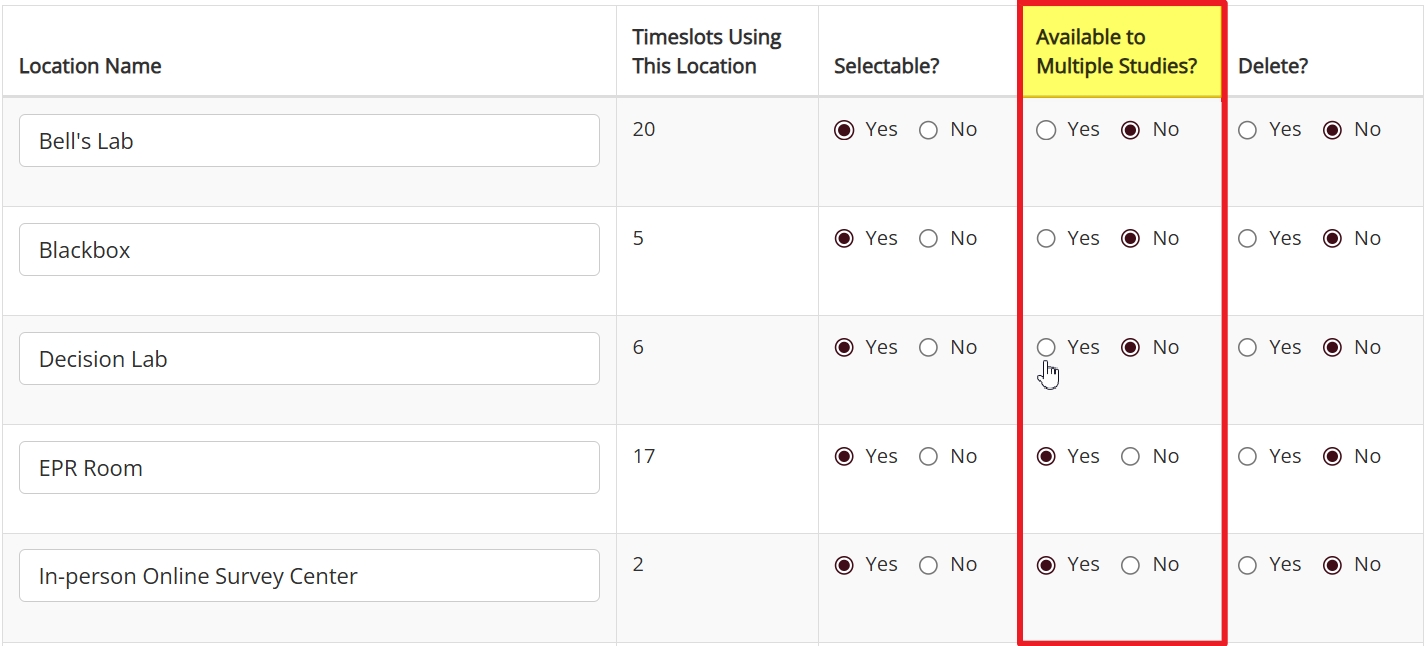
Shared locations are locations with “Available to Multiple Studies?” enabled on your Location Listings page. With Shared locations, multiple timeslots from different studies can reserve the same location for the same time. Essentially, Shared locations allow researchers to temporarily share timeslots across studies.

How does it work?
Shared locations can be reserved for multiple timeslots across different studies, but they can only be used by one. The difference between non-Shared and Shared locations is in how the system determines whose timeslot gets to have the reservation. If a location isn’t share, the first researcher to add a timeslot using that location gets it. For Shared locations, multiple timeslots can reserve the same location for the same time, so long as none of their slots are filled. Once a participant signs up for one of the timeslots, the others will become unavailable.

When should I use it?
The Shared location option is specifically designed for locations with high demand and/or limited availability. If researchers are competing to be the first to reserve time in a location, you want to be sure that this time is used well. Because actual signups determine which study’s timeslot remains available, this option ensures valuable resources aren’t wasted.

For details, examples, and more, please see below.

Adding & Filling Timeslots with & without Shared Locations

You can designate a location to be a Shared location by selecting “yes” to the “Available to Multiple Studies?” option on your Location Listings page. Of course, researchers can technically share any location, even those not listed. The question, however, is how a Shared locations work compared to non-shared. Shared locations change the way researchers can make the most out of (possibly too few) research locations as well as (potentially limited) available time in those locations.

The best way to understand this difference is to contrast the way the system handles scheduling conflicts with Shared locations vs. other listed locations. To make this easier, we’ve provided a side-by-side comparison versions of essentially the same process. Both versions start with a researcher trying to add a timeslot to their study when the time and location they want is already reserved, and end with how location type changes the way participant signups work:

Scheduling Conflict without Shared Locations
A researcher adds a timeslot and selects a regular (“non-shared”)
System checks for a scheduling conflict
If another study has a timeslot that overlaps with the specified time and location, the system prevents the researcher from adding their timeslot
The researcher is informed that they cannot add the timeslot because other timeslots “are scheduled in the same location” and during the same time as that chosen by the researcher
When a participant selects a timeslot with a non-shared location this has no effect on timeslots from other studies. Timeslots for non-shared locations are always uniquely reserved, such that there is no overlap even with timeslots for the same study
Scheduling Conflict with Shared Locations
A researcher adds a timeslot and selects a Shared location
System checks if location is *reserved* at that time
If another study has a timeslot that overlaps with the specified time and location, the system checks to seem if the two timeslots begin and end at the same time
If the time periods overlap but do not match, the system prevents the researcher from adding the timeslot
If the new timeslot begins and ends at the same time as the existing timeslot, the timeslot is added, with both timeslots temporarily reserving the Shared location for that time
Shared timeslots will remain available to eligible participants until the first participant signs up for a slot in one of the shared timeslots
Different Ways to Deal with Double-Booking

The side-by-side comparison above provides a quick overview of how the system handles scheduling conflicts with timeslots using Shared locations vs. timeslots using other locations. Now it’s time to get into a bit more detail.

First, and to prevent any confusion, it’s important to understand that Shared locations do not actually allow two researchers (let alone more!) to share the same location during the same time window. Shared locations are not a way to override scheduling conflicts, but a way to handle them differently.

If a location is a Shared location, researcher can add timeslots using this location to different studies providng that the start and end times match, albeit temporarily.

The qualifier “temporarily” exists because the system will still resolve the scheduling conflict automatically. It’s just a matter of when this happens and why.

A regular (i.e., “non-shared”) location is reserved as soon as a researcher adds a timeslot to their study using this location. With Shared locations, multiple timeslots co-exist so long as no participants have signed up for any of them. You can think of the different timeslots for different studies, each one using the same Shared location and each one starting and ending at the same time, as a Shared timeslot. The use of the singular is deliberate. Although there are multiple temporary timeslots in a single Shared timeslot, ultimately there will be only one. As soon as one of these timeslots has a signup, the system reserves the location for the timeslot the participant signed up for. The other timeslots will no longer be available.

This is the basic process. We could go into greater detail, but there’s a better way to explain both how a Shared location works in practice and the logic behind the process: An example.

How it Works: An Illustration by Example

To start our example, let us introduce two researchers: Alice and Bob. Both work out of the same institute and, while they do occasionally collaborate (indeed, both sometimes quite famously, and sometimes with the famous!), for the most part each conducts studies independently of the other.

At the moment, these two researchers are each in the final stages of setting up a study in Sona. Alice’s study is Study Alpha, while Bob’s study is “Fun and Games for Fun and Profit”. Both are active and approved, and our two researchers are each in the process of adding timeslots to their respective studies.

This should all be familiar territory. We’ll briefly remain on familiar grounds, because we want to compare (now using this example) how scheduling works with both non-shared and Shared locations, so why not start with what’s familiar?

Non-Shared Locations: Sharing a location without using a Shared location:

Alice and Bob are both trying to reserve highly sought-after locations for early November. At the moment, they are both interested in reserving time in the Observance Lab 1 for 11AM on November 5th. It just so happens that Alice adds her timeslot first. Thus, when Bob attempts to add a timeslot to his study for the same time on the same day, he receives the following message:

It’s first come, first serve, and Alice got there first. When Bob tries to add his timeslot, the system checks availability, sees that the location is reserved by Alice, and prevents Bob from adding his timeslot.

Sometime later, participants begin checking their accounts for available studies and looking at available times for those studies they find interesting. Many participants click on the study “Fun and Games for Fun and Profit” to view additional details before checking for available times. Many sign up for this study, and there are more participants who want to sign up then there are available timeslots.

Surprisingly few participants click on Study Alpha, which isn’t surprising given the study name and the fact that the description reads: “This is a Study. It is for research.” Even fewer participants bother to look at available times.

Importantly, only those few participants who do bother to look at timeslots for study Alpha will ever see the one reserving Observance Lab 1 on November 5th. None of them sign up for it, though. This wouldn’t be as big of a deal were it not for the fact that Bob, who was somewhat slower adding timeslots, has no more available and the lab he needs is completely booked.

Thus, on November 5th at 11AM, Observance Lab 1 is empty, despite Bob’s need for the location and in spite of it being available to participants (if only they had elected to participate in Alice’s study).

This is what can happen when researchers share a location, but without it being a Shared location (i.e., without “Available to Multiple Studies?” enabled). We’re now going to go back and time and repeat the same process. This time, however, the Observance Lab 1 will be a Shared location.

Shared Location Advantages

This is going to be basically the same example with one small but important change: Observance Lab 1 is now a Shared location. Everything proceeds as it did previously right up until the moment Bob tries to add a timeslot using Observance Lab 1 for 11AM on November 5th. This time, when the system checks and finds that Alice has already booked Observance Lab 1 on that date and time, it also sees the location can be shared across studies.

Next (and this is important!), the system checks to make sure that the time period Bob is trying to reserve starts and ends at the same time as Alice’s. If one study runs longer, than the system will see treat this as a scheduling conflict.

Luckily, both Alice and Bob’s timeslots are for one hour, so the system allows Bob to add this timeslot.

Time goes by (as it often does), and once more participants log in to their accounts. This time, participants who click on Bob’s study and check for timeslots will see the one for 11AM November 5th in Observance Lab 1. The same is still true (at least initially) for participants who check the timeslots for Study Apha.

Now, however, as soon as a participant signs up for Bob’s study (because, let’s be honest, they’re not going to sign up for Study Alpha), and picks the timeslot using the shared location, Alice’s timeslot for November 5th at 11AM will no longer be available. Participants can still sign up for Bob’s timeslot for 11AM on November 5th until all available slots fill up.

The important point, and the main takeaway for this part of the example, is that because a participant signed up for Bob’s timeslot first, he gets the reservation.


Generalizing the Example

The above example illustrates how Shared locations work, but it revolves around a single shared timeslot (a shared location with at least one timeslot reserving a block of time). While its simplicity makes the example easier to follow, it doesn’t do as good of a job at demonstrating how this option can work for you. Let’s remedy that.

The obvious starting point is to start thinking beyond two researchers competing for one time window and one location. Instead, you may imagine an institute or department with some large, expensive machinery—an MRI machine, a large (and expensive!) flight simulator, etc.—that can only be used by one participant at a time, and is used by multiple researchers conducting studies independently from one another.

Under such conditions, a standard approach is to have a lab coordinator make researchers provide a bunch of paperwork way in advance in order to reserve one of a limited number of available slots months in advance. If they are reall lucky, they may even get a reasonable number of slots allotted, so that when can show they have approval and provide the other paperwork required, they can sign up for more than a single hour. Then they have to hope participants actually sign up for these previous blocks of time they reserved.

Then imagine this same sort of scenario, only now the neuroimaging lab or robotics lab or whatever lab is a Shared location. Often, studies involving expensive equipment have a fair amount of prep before the participant even walks in as well as some at the end of the study (e.g., resetting the equipment/space, removing equipment that was added at the start of the study such as specialized keyboards or controls, etc.). In short, it’s often more practical for those in charge of such facilities to offer blocks of time with a standardized duration.

If a lab like this is a Shared location, you can certainly still used these pre-specified time windows if you want. If anything, they can be even more effective for a Shared location. Instead of having one researcher sign-up for one block of time (or whatever number they are allotted), these time windows can be reserved for multiple studies. This way, in addition to more fairly and easily sharing valuable time in a lab with limited availability, you also make sure that no researcher reserves precious time only to have no participants.

When a bunch of researchers independently add timeslots using the same Shared location for the same time, the only way for it to be wasted is if no participants sign up for any of them.

Coordinating Shared Timeslots with View Schedule

We’ve seen what Shared locations do and an example of how a Shared location works in practice. That’s most of what you need to know. Before we close, though, there are a few additional tools and tips to be aware of. Of these, perhaps the most important is the schedule for shared locations. After all, this feature helps coordinate scheduling for locations.
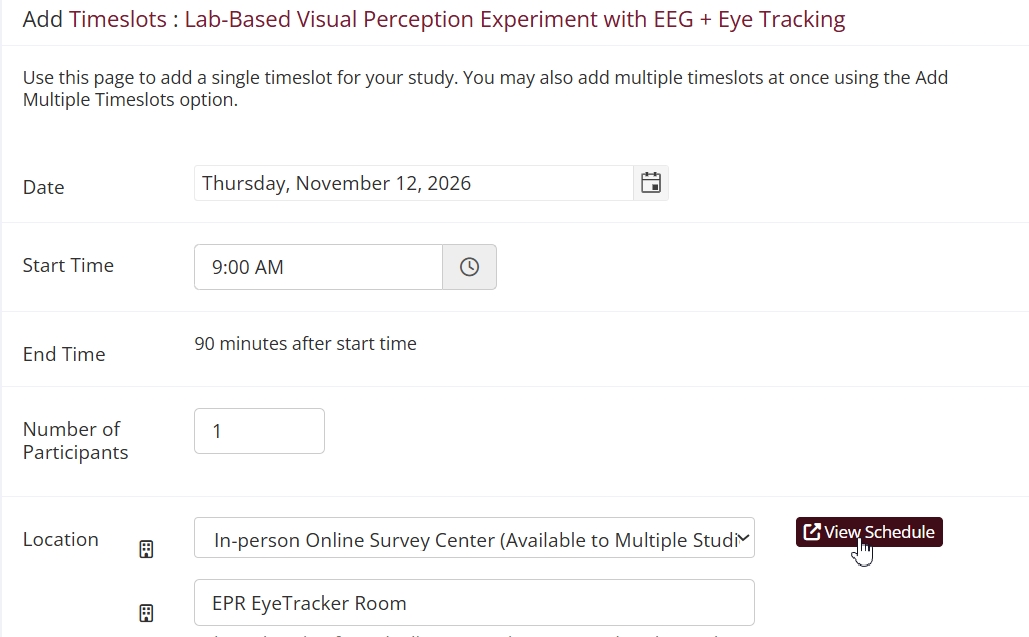
You can view the schedule for any location on the day selected by clicking on the View Schedule button when adding or editing timeslots:

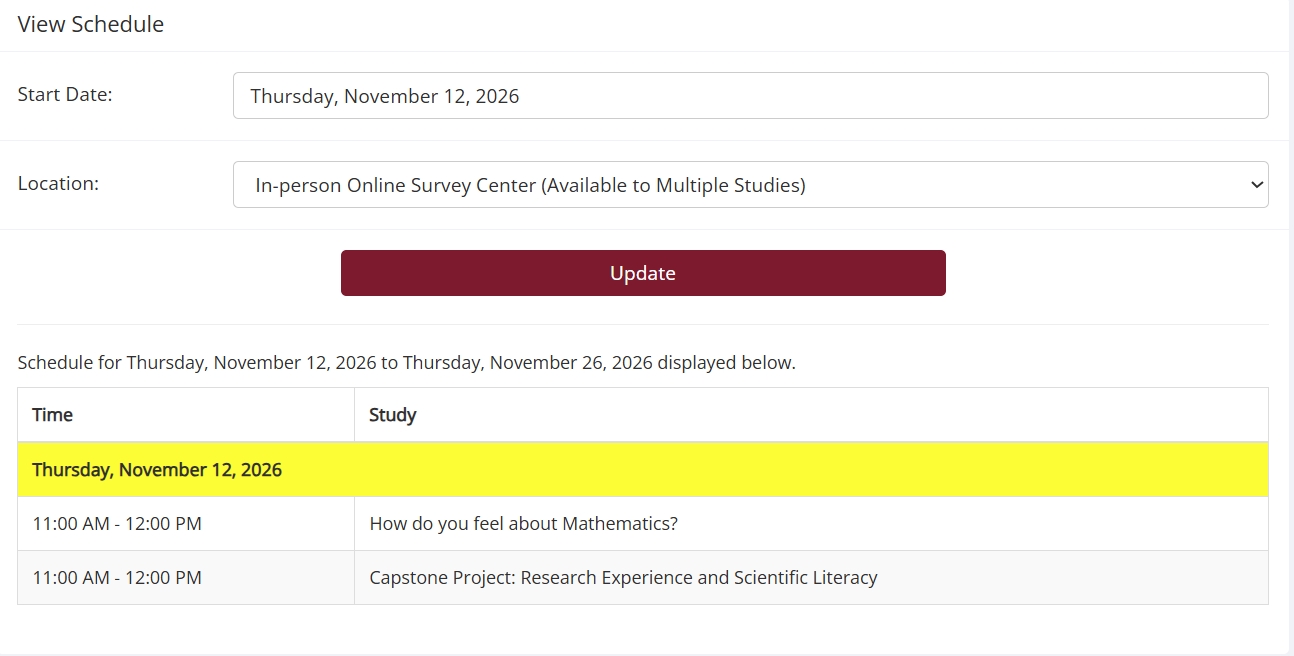
This will open a pop-up view for location usage on that day:

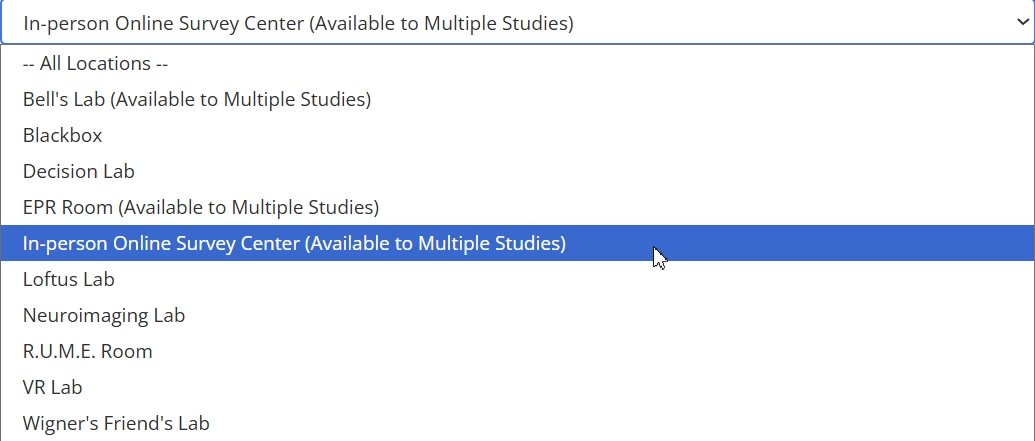
You can cycle through different locations using the dropdown menu. The menu will indicate which locations are shared locations:

Those locations with the “Available to Multiple Studies” parenthetical are Shared locations. Please note that simply selecting a different location won’t automatically show the schedule for that location. You need to click the update button first.

When researchers add a timeslot using a shared location, the View Schedule feature gives them the start and end times for any given day. This makes it much easier for researchers to make their timeslots part of a shared timeslot. They merely have to 1) make sure they use the same start time and 2) make sure that their study duration is compatible.

Other Tools

View Schedule isn’t the only tool that can help you make the most out of Shared locations. View Schedule focuses on a particular day, for good reason. It’s there to help researchers pick times when adding a timeslot, so it displays the schedule for the day of that timeslot.

What if you want a more general look usage for a location or locations for longer periods of time? For administrators, this is particularly easy. On the Generate Reports page, administrators can use Study Schedule to generate a report for a specific location or all locations. They can also set a start date and end date, then view the schedule for that date range.

Researchers do not have this option, but that doesn’t mean they are left without tools designed with researchers in mind. Researchers can easily make their study schedules available to other researchers using the Calendar Feed feature.

You may have noticed that all of these tools are related to calendars and schedules. This is not an accident. Certain features provide administrators with the kind of bird’s eye view that makes it easier to help researchers determine time blocks for shared locations, as well as to track these. For researchers, the focus is more specific to studies, whether it is the View Schedule to help with a timeslot, or adding Calendar Feeds to one another’s calendars to better coordinate shared location usage.

Closing Considerations

We’ve covered the basics Shared locations and beyond. At this point, you should have a good grasp of what making a location a Shared location entails.

We’d like to conclude with some advice that may be especially helpful to administrators or those in similar positions who understand the mechanics of Shared locations, but for one reason or another still wonder whether to use this feature.

If you’ve read through this post, and you are still not sure whether Shared locations would benefit your researchers, don’t worry! This last section has you in in mind.

Perhaps you are a new administrator. Or maybe you are an experienced administrator, but you haven’t had a lot of experience scheduling timeslots because your site doesn’t use the Location Listings page. Maybe your researchers tend to have their own locations, so sharing is seldom if ever an issue. The specific context doesn’t necessarily matter. What’s important is that these and other situations may mean that you’ve never encountered the type of situations that introduced Shared locations to address.

That’s ok. The only question is whether that issue currently exists behind the scenes (so to speak) or may exist in the future. Figuring out whether or not Shared locations may benefit your researchers is typically a simple matter. You just need the researchers on your site whether they tend to run into scheduling conflicts or use some sort of scheduling system to share locations outside of Sona. If the answer to either of these is yes, then tell them about Shared locations (or make it easy on yourself and just direct them to this blog!).

If the answer is no, and researchers don’t run into problems with location availability or a need to schedule around one another, great!

That being said, research isn’t stagnant, and neither are the conditions in which it is carried out. This is the final takeaway we have for you: Keep this option in mind. Sometimes, a site goes from conducting only online research to also conducting lab studies. Sometimes additional research groups are added without additional resources like space.

If something like this happens, or your researchers start to complain about never getting the “good” locations at the best times, keep Shared locations in mind. You may never need to use them, but if things change and your researchers are suddenly frantic about not getting timeslots in X location or suddenly competing for timeslots thanks to the new research group, wouldn’t it be great to be the miracle worker who somehow magically changed how locations worked to make everyone happier?